Introduction
Whether you are attending classes, preparing for exams, managing projects, or organizing daily tasks, taking clear and organized notes is essential. Traditional notebooks still have their place, but digital note-taking has become the preferred choice for many students and working professionals. With smartphones, tablets, and laptops always within reach, it has never been easier to capture ideas, create checklists, save research, and collaborate with others.
The top note-taking apps for students and professionals offer much more than simple text editing. They allow users to organize notebooks, add images, record voice notes, scan documents, create to-do lists, and synchronize information across multiple devices. These features help users stay productive regardless of where they are working or studying.
Choosing the right app can make a noticeable difference in daily efficiency. Some applications are designed for detailed lecture notes, while others focus on project management, brainstorming, or team collaboration. Understanding the strengths of each option helps you select one that matches your personal workflow and productivity goals.
This guide explores the top note-taking apps for students and professionals, explains why they matter, compares their major features, and provides practical advice for selecting the right application. Whether you are a beginner looking for a simple note organizer or a professional searching for an advanced digital workspace, you will find useful recommendations that suit different needs and budgets.
What Are Top Note-Taking Apps for Students and Professionals?
Note-taking apps are digital tools that allow users to create, organize, edit, and access notes from almost any device. Instead of relying on paper notebooks, these applications provide a flexible and searchable environment where information is stored safely in the cloud or on local devices.
The top note-taking apps for students and professionals are built to improve productivity by combining writing tools with organization features. Most modern applications include folders, notebooks, tags, reminders, templates, collaboration options, and synchronization between smartphones, tablets, and computers.
Unlike traditional notebooks, digital note-taking apps let users quickly search for keywords, attach files, insert links, and even scan handwritten pages into editable documents. Many apps also support handwriting using digital pens, making them suitable for tablet users who enjoy writing naturally.
Students often use these applications to organize lecture notes, prepare assignments, store research materials, and create study plans. Professionals rely on them for meeting notes, project planning, client information, brainstorming sessions, and task management.
Another advantage is accessibility. Your notes remain available whether you are at school, in the office, working remotely, or traveling. Automatic synchronization ensures your latest updates appear across all connected devices.
Today, note-taking apps have evolved into complete productivity platforms that support individual work as well as team collaboration.
Why Are Note-Taking Apps Important?
Digital note-taking has become an essential skill because information is constantly growing. Managing lectures, meetings, assignments, deadlines, and ideas becomes much easier when everything is organized in one place.
Some important reasons include:
- Faster organization of information.
- Easy access from multiple devices.
- Reduced paper usage.
- Better collaboration with classmates and coworkers.
- Quick keyword search instead of flipping through notebooks.
- Automatic backups that reduce the risk of losing important notes.
- Integration with calendars, reminders, and productivity tools.
Students often collect hundreds of pages of notes during a semester. Searching through physical notebooks takes time, while digital notes can be found within seconds using the search feature.
Professionals also benefit from centralized information management. Meeting summaries, client details, project updates, and task lists remain organized, helping teams work more efficiently.
Many note-taking applications also support multimedia content. Users can add screenshots, PDFs, audio recordings, videos, tables, and web links to create richer and more informative notes.
As remote learning and hybrid work continue to grow, digital note-taking has become a practical solution for keeping important information organized and accessible.
Detailed Step-by-Step Guide
Step 1: Understand Your Note-Taking Needs
Before downloading any application, determine how you plan to use it.
Ask yourself:
- Will you mainly take lecture notes?
- Do you attend business meetings?
- Do you need handwritten notes?
- Will you collaborate with others?
- Do you require offline access?
- Is cloud synchronization important?
Your answers will narrow your choices significantly.
For example, students usually prioritize organization and quick searching, while professionals may need collaboration features and project integration.
Step 2: Look for Cross-Platform Compatibility
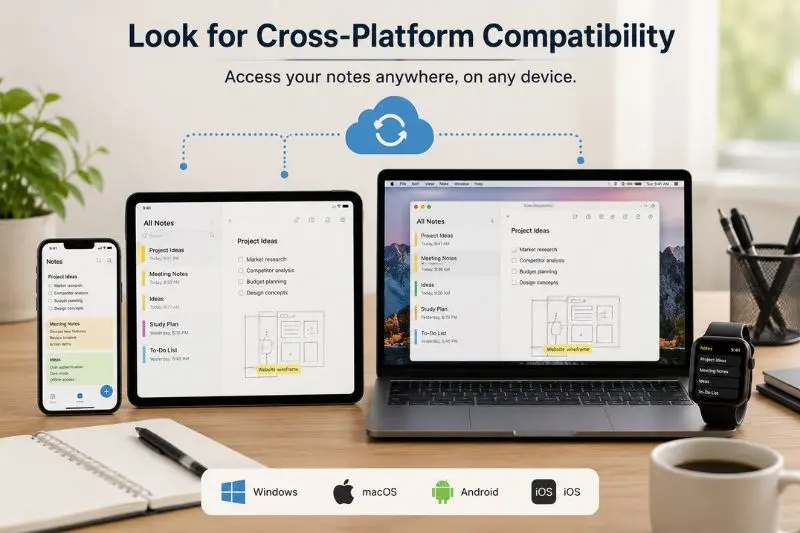
One of the biggest advantages of the top note-taking apps for students and professionals is their ability to work across multiple devices.
A good app should allow you to:
- Start notes on your laptop.
- Edit them on your phone.
- Review them on your tablet.
- Access everything from the web.
Cross-device synchronization saves time and ensures you always have the latest version of your notes.
Cloud syncing also protects your information if one device becomes damaged or lost.
Step 3: Evaluate Organization Features
A note-taking app should help you stay organized instead of creating digital clutter.
Look for features such as:
- Folders
- Notebooks
- Tags
- Labels
- Color coding
- Pinning important notes
- Search filters
These tools make it much easier to manage hundreds or even thousands of notes over time.
Students can organize notebooks by subject, while professionals can separate notes according to clients, departments, or projects.
Step 4: Compare Popular Note-Taking Apps
Several applications consistently rank among the best because of their reliability and features.
Some of the most popular choices include:
Microsoft OneNote
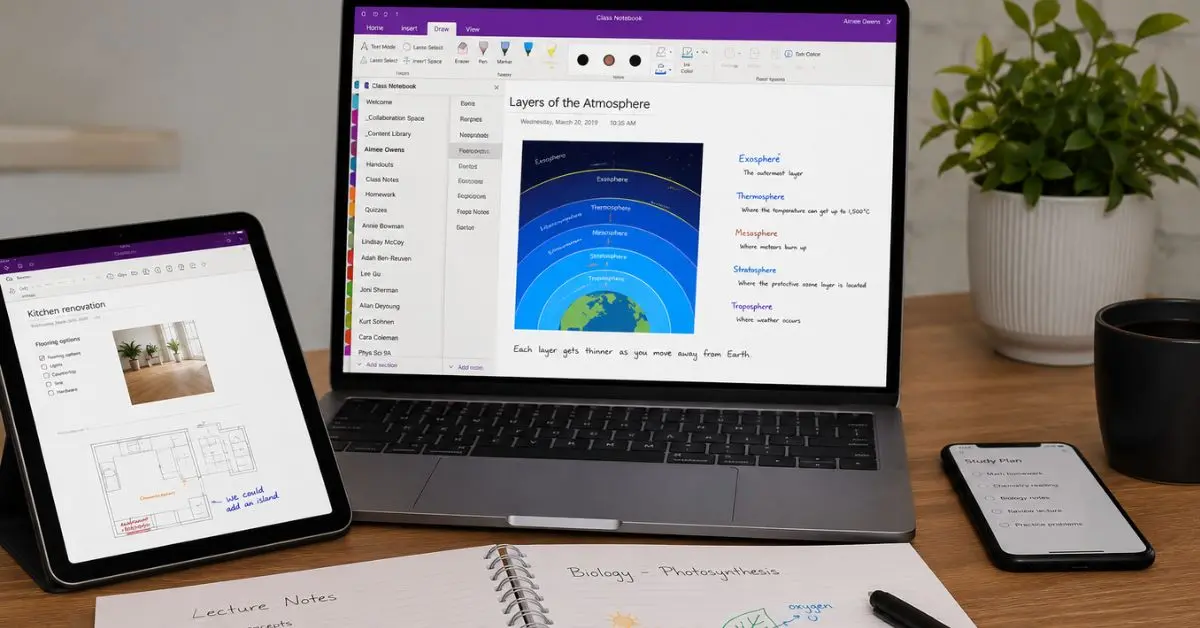
OneNote provides a notebook-style layout with sections and pages, making it excellent for students who organize subjects separately. It supports handwriting, images, audio recording, document scanning, and seamless synchronization across devices.
Evernote
Evernote focuses on organization and productivity. Users can clip webpages, scan documents, create task lists, and organize notes with tags. It is ideal for professionals handling research, meetings, and long-term projects.
Google Keep
Google Keep offers a clean and simple interface perfect for quick notes, reminders, shopping lists, and color-coded organization. It integrates smoothly with other Google services, making it a great option for beginners.
Notion
Notion combines note-taking with project management. Users can create databases, calendars, checklists, wikis, and collaborative workspaces, making it especially useful for teams and advanced users.
Apple Notes
Apple Notes is an excellent choice for users within the Apple ecosystem. It supports folders, smart search, document scanning, handwritten notes, password protection, and seamless synchronization across Apple devices.
These applications each serve different purposes, so choosing the right one depends on your personal workflow rather than simply selecting the most popular option.
Compare Free and Premium Versions
Most note-taking apps provide both free and paid plans. Before subscribing, determine whether the premium features are necessary for your work or studies.
Free plans are usually enough for basic note-taking, reminders, and cloud synchronization. However, premium subscriptions often include additional storage, advanced search, version history, collaboration tools, offline access, and enhanced security.
Students with simple academic requirements may find free plans sufficient, while professionals managing multiple projects or large teams often benefit from premium features.
Step 6: Test the User Interface
An application should make your work easier, not more complicated. Spend a few days testing different apps before making your final decision.
Consider these questions:
- Is navigation simple?
- Can you quickly create new notes?
- Is the search function accurate?
- Does the layout feel comfortable?
- Can you organize notes without confusion?
A clean interface encourages consistent note-taking and reduces distractions.
Step 7: Check Collaboration Features
Many modern workplaces and educational institutions require teamwork.
If you frequently work with classmates or colleagues, choose an app that supports:
- Shared notebooks
- Real-time editing
- Comments
- Task assignments
- Permission controls
- File sharing
Collaboration tools eliminate the need to exchange multiple document versions and keep everyone working from the same information.
Step 8: Consider Security and Privacy
Notes often contain personal information, academic research, meeting records, passwords, financial planning, or confidential business discussions.
Look for security features such as:
- Password protection
- Biometric authentication
- Two-factor authentication
- Encrypted cloud storage
- Automatic backup
Protecting sensitive information should always be a priority.
Step 9: Explore Advanced Productivity Features
The top note-taking apps for students and professionals now include productivity tools beyond basic writing.
Helpful advanced features include:
- Voice recording
- Optical Character Recognition (OCR)
- PDF annotation
- Calendar integration
- Reminder notifications
- Task management
- Templates
- Tables
- Mind maps
- Handwriting support
These tools allow users to manage nearly every aspect of their workflow inside a single application.
Step 10: Choose the Best App for Your Workflow
There is no single app that suits everyone.
For example:
- Students who need structured notebooks often prefer Microsoft OneNote.
- Users wanting quick reminders usually appreciate Google Keep.
- Professionals managing research frequently select Evernote.
- Teams handling complex projects often benefit from Notion.
- Apple users enjoy the seamless experience provided by Apple Notes.
Instead of following trends, choose the application that matches your daily habits and long-term needs.
Benefits of Top Note-Taking Apps for Students and Professionals
Using digital note-taking software offers numerous advantages for both education and the workplace.
Some of the biggest benefits include:
- Improved organization of notes and documents.
- Faster searching using keywords.
- Easy synchronization across multiple devices.
- Reduced dependence on paper notebooks.
- Better productivity during classes and meetings.
- Secure cloud backup for important information.
- Easy sharing with classmates and coworkers.
- Support for images, videos, audio recordings, and PDFs.
- Better project planning and task management.
- Convenient access from virtually anywhere.
- Time savings through templates and automation.
- Improved collaboration in group assignments and office projects.
- Less clutter compared to physical notebooks.
- Easier revision before exams or presentations.
- Flexible organization using folders, notebooks, and tags.
Students often discover that organized digital notes improve revision sessions because information is easier to locate. Professionals save valuable time by keeping meeting notes, client information, and project plans in one searchable workspace.
Disadvantages and Risks
Although digital note-taking provides many advantages, users should also understand its limitations.
Some common disadvantages include:
- Learning curves for advanced applications.
- Subscription costs for premium features.
- Internet dependency for cloud synchronization.
- Battery limitations on mobile devices.
- Possible distractions from notifications.
- Data loss if backups are not enabled.
- Compatibility issues between platforms.
- Storage limitations on free plans.
- Privacy concerns when using cloud services.
- Overcomplicated organization systems that reduce efficiency.
Fortunately, most of these risks can be minimized through regular backups, strong passwords, and selecting a reliable application that meets your specific needs.
Common Mistakes to Avoid
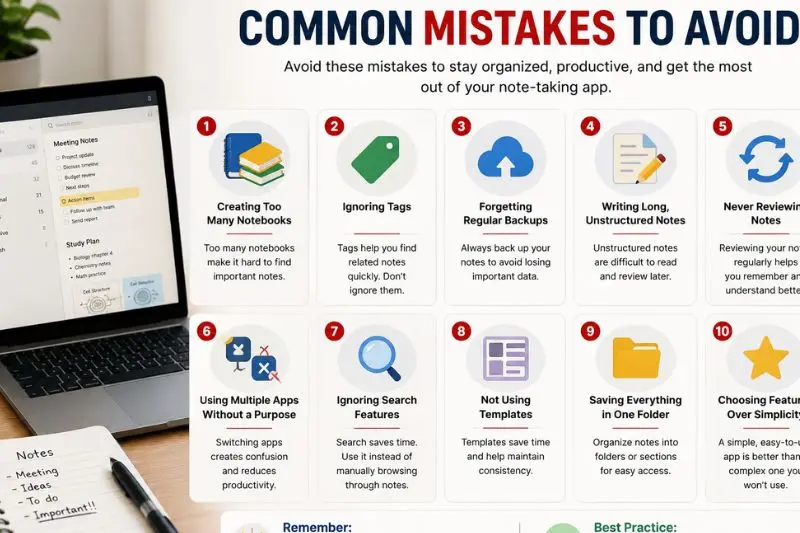
Many users fail to get the most from their note-taking applications because of poor habits rather than software limitations.
Avoid these common mistakes:
1. Creating Too Many Notebooks
Having dozens of notebooks makes navigation difficult. Instead, organize information into a manageable structure with clearly defined categories.
2. Ignoring Tags
Tags improve searchability and make finding related notes much easier.
3. Forgetting Regular Backups
Always enable automatic synchronization or export important notes regularly.
4. Writing Long, Unstructured Notes
Break information into headings, bullet points, numbered lists, and short paragraphs for easier reading.
5. Never Reviewing Notes
Taking notes is only part of the learning process. Review them regularly to improve memory and understanding.
6. Using Multiple Apps Without a Purpose
Switching constantly between different note-taking applications creates unnecessary confusion.
7. Ignoring Search Features
Many users manually browse notebooks instead of using the built-in search tool, wasting valuable time.
8. Not Using Templates
Templates speed up note creation for lectures, meetings, project planning, and daily task management.
9. Saving Everything in One Folder
Separate notes by subjects, projects, departments, or priorities to stay organized.
10. Choosing Features Over Simplicity
The most feature-rich application is not always the most productive. Select a tool that fits your workflow rather than one with unnecessary complexity.
By avoiding these mistakes, both students and professionals can enjoy a smoother, more organized, and more productive note-taking experience.
FAQs
Which note-taking app is best for students?
The best app depends on individual learning styles and study habits. Students who prefer structured notebooks often choose Microsoft OneNote because it allows subjects to be organized into sections and pages. Those looking for a simple solution may find Google Keep more suitable for quick reminders and short notes. If project management is also important, Notion offers powerful customization options that combine notes, tasks, and databases in one workspace.
Which note-taking app is best for professionals?
Professionals usually benefit from apps that support collaboration, cloud synchronization, document organization, and task management. Evernote is an excellent option for organizing research and meeting notes, while Notion works well for managing projects and team documentation. Choosing the right application depends on the size of your workload and the features you use most frequently.
Are free note-taking apps good enough?
Many free note-taking applications provide everything needed for everyday use, including note creation, organization, search functions, and synchronization across devices. Premium subscriptions become valuable only when users require larger storage, advanced collaboration, additional security, or specialized productivity tools.
Can I access my notes on multiple devices?
Most modern note-taking apps automatically synchronize data across smartphones, tablets, laptops, and desktop computers. After signing in with the same account, your latest notes remain available regardless of the device you use. This feature is especially useful for students studying on different devices and professionals working remotely.
Are digital notes safer than paper notebooks?
Digital notes can be more secure when protected with strong passwords, encryption, biometric authentication, and regular cloud backups. Unlike paper notebooks that can be lost or damaged permanently, digital notes often remain recoverable even if a device is replaced. However, users should always enable backup features and protect their accounts with strong security settings.
How can I improve my note-taking skills?
Effective note-taking starts with writing clear headings, using bullet points, organizing information into sections, and reviewing notes regularly. Adding tags, color labels, and summaries makes information easier to locate later. Consistency is more important than writing lengthy notes, so focus on capturing key ideas in a well-structured format.
Expert Tips & Bonus Points
To get the most value from the top note-taking apps for students and professionals, develop a consistent system rather than constantly switching between applications. A familiar workflow saves time and reduces confusion.
Create separate notebooks for subjects, work projects, or personal tasks. Within each notebook, use folders, tags, or labels to group related information logically. This simple habit makes finding older notes much easier.
Review your notes regularly instead of waiting until exams or important meetings. Weekly reviews reinforce learning, refresh your memory, and help identify missing information before it becomes a problem.
Take advantage of templates whenever possible. Meeting agendas, lecture summaries, project plans, and daily journals become much faster to create when you begin with a reusable format.
Include images, screenshots, diagrams, and scanned documents whenever they improve understanding. Visual content often explains complex ideas more effectively than text alone.
Use reminders and task lists to transform your note-taking app into a complete productivity tool. Combining notes with actionable tasks helps you stay organized and ensures that important deadlines are not overlooked.
Finally, keep your notes simple and focused. Clear organization, concise writing, and regular maintenance are far more valuable than creating complicated systems that become difficult to manage over time.
Conclusion
Choosing among the top note-taking apps for students and professionals is ultimately about finding a tool that matches your learning style, work habits, and productivity goals. While every application offers different strengths, the best choice is one that helps you capture information quickly, organize it efficiently, and retrieve it whenever you need it.
Digital note-taking has transformed the way students study and professionals manage their daily responsibilities. Features such as cloud synchronization, advanced search, multimedia support, collaboration tools, and automatic backups make these applications far more versatile than traditional notebooks. They save time, improve organization, and allow important information to remain accessible across multiple devices.
As technology continues to evolve, note-taking apps are becoming even more intelligent and flexible. Whether you need a simple solution for classroom lectures or a powerful workspace for business projects, there is an application designed to meet your requirements. Start by identifying your priorities, test a few options, and build a consistent note-taking routine that supports your long-term success.
By selecting the right application and following the best practices discussed in this guide, you can stay organized, improve productivity, and manage information more effectively in both academic and professional environments. Investing a little time in choosing the right note-taking app today can lead to better efficiency, stronger collaboration, and greater success in the future.